WordPress Integration: Agent-Ready Commerce Without Replatforming

Connect your WordPress site to AI-powered discovery channels. Get your content and products discovered by ChatGPT, Perplexity, and Google AI via REST API integration in under 4 hours.

eLLMo Team
eLLMo Team
10 min read

Overview

For WordPress sites and WooCommerce stores that need measurable AI visibility without changing CMS. eLLMo AI integrates with your existing WordPress stack to make pages and products discoverable, accurate, and transactable across AI surfaces like ChatGPT, Google AI, and Perplexity. No replatforming required. Your site stays as-is.

eLLMo connects via standard WordPress capabilities: XML sitemaps, native REST API, and webhooks. We discover and score every URL, normalize your content and optional WooCommerce catalog into an agent-ready format, and distribute via open protocols (UCP, ACP, MCP, A2A) so AI assistants can discover, recommend, and cite your brand with accurate data. Track visibility with Answer Engine Optimization dashboards showing your Share of AI Voice across platforms.

What You Get

Increased AI citations and visibility

When ChatGPT, Claude, and Perplexity cite your content with accurate details, traffic and authority grow. eLLMo makes that happen.

Production-safe integration

No custom themes, no plugins required. Connect via REST API and webhooks using WordPress core capabilities.

Fast time to value

Typical setup completes in under 4 hours including data connection and initial enrichment. No months-long cycles.

Measurable outcomes

Track Share of AI Voice, citation trends, and competitor benchmarks with AEO dashboards and historical analytics.

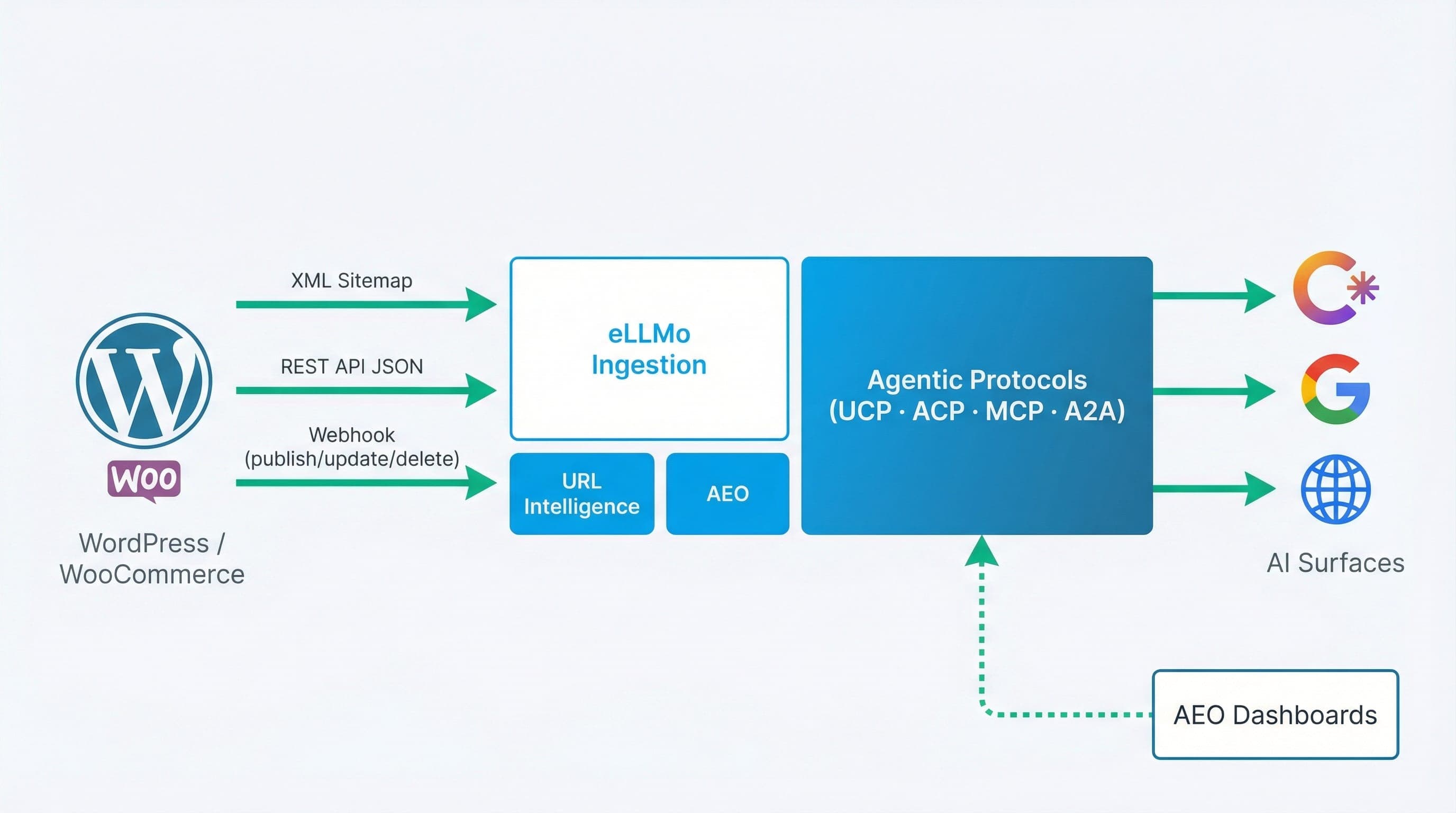
WordPress and eLLMo AI integration architecture showing data flow from WordPress via XML Sitemap and REST API through eLLMo ingestion to protocol distribution and AI assistants

WordPress provides content via XML sitemaps and REST API. eLLMo ingests, scores with URL Intelligence, enriches, and distributes via protocols to AI assistants. AEO monitors visibility.

Supported Integrations

eLLMo delivers three core capabilities for WordPress and WooCommerce sites, with enterprise-grade governance and audit trails built in.

CapabilityWordPress SupportNotes
URL IntelligenceYesAutomatic sitemap parsing; multi-dimensional scoring; rank 1–100; deployment tracking.
Answer Engine OptimizationYesCross-platform citations, mentions, trend analysis, alerts, and audit trails.
Content IntelligenceYesAI-optimized content generation, structured FAQs, schema proposals fact-checked against your data.
WooCommerce CatalogYesProduct data ingestion and enrichment; agent-ready structure for AI surfaces.
Protocol DistributionYesProtocol-native support for UCP, ACP, MCP, A2A; direct API integrations.
Governance & AuditYesConfidence scoring, target management, audit-ready logs for enterprise control.

Key outcomes: Increase AI citations and answer presence. Reduce manual analysis via prioritized, page-level recommendations. Maintain enterprise-grade governance with targets, audit trails, and change history.

Getting Started

This workflow connects your WordPress site to eLLMo for URL Intelligence, content optimization, and Answer Engine Optimization. Implementation paths use standard WordPress capabilities: XML sitemaps, native REST API, and webhooks for incremental updates.

Prerequisites

Your roadmap to AI-first commerce

1

WordPress admin access

Access to configure REST API endpoints and manage webhooks via theme functions or must-use plugins.

2

Canonical XML sitemap

Confirm sitemap location (e.g., /sitemap.xml) and ensure all public post types are included.

3

REST API enabled

WordPress REST API should be accessible for content export. No custom plugins required.

4

eLLMo workspace credentials

Provided by your eLLMo Solutions team during onboarding for webhook authentication.

5

Optional: WooCommerce products

For commerce sites, include WooCommerce product data for catalog enrichment and distribution.

To stay up to date, follow us on LinkedIn and sign up to our mailing list via our mailing list.

Setup Steps

1

Confirm canonical XML sitemap and URL structure

Ensure your sitemap includes all public post types and follows consistent, human-readable URL conventions with breadcrumbs.

2

Expose content via WordPress REST API

Verify posts, pages, and custom post types are accessible via REST API. Add a custom endpoint if needed for bulk export (see code samples below).

3

Add webhooks for incremental updates

Instrument webhooks on publish/update/delete actions to notify eLLMo ingestion endpoints for near-real-time freshness (see code samples below).

4

Connect to eLLMo and enable URL Intelligence

Add your WordPress site URL and credentials in the eLLMo console. URL Intelligence will discover, score, and rank pages 1–100 across four dimensions.

5

Review scores and implement recommendations

Address top-impact opportunities: improve structured data (JSON-LD), internal links, semantic relevance, and performance per page-level recommendations.

6

Connect Answer Engine Optimization and baseline citations

Track citations and mentions across ChatGPT, Google AI Overview, and Perplexity. Set up alerts for visibility changes and monitor trends over time.

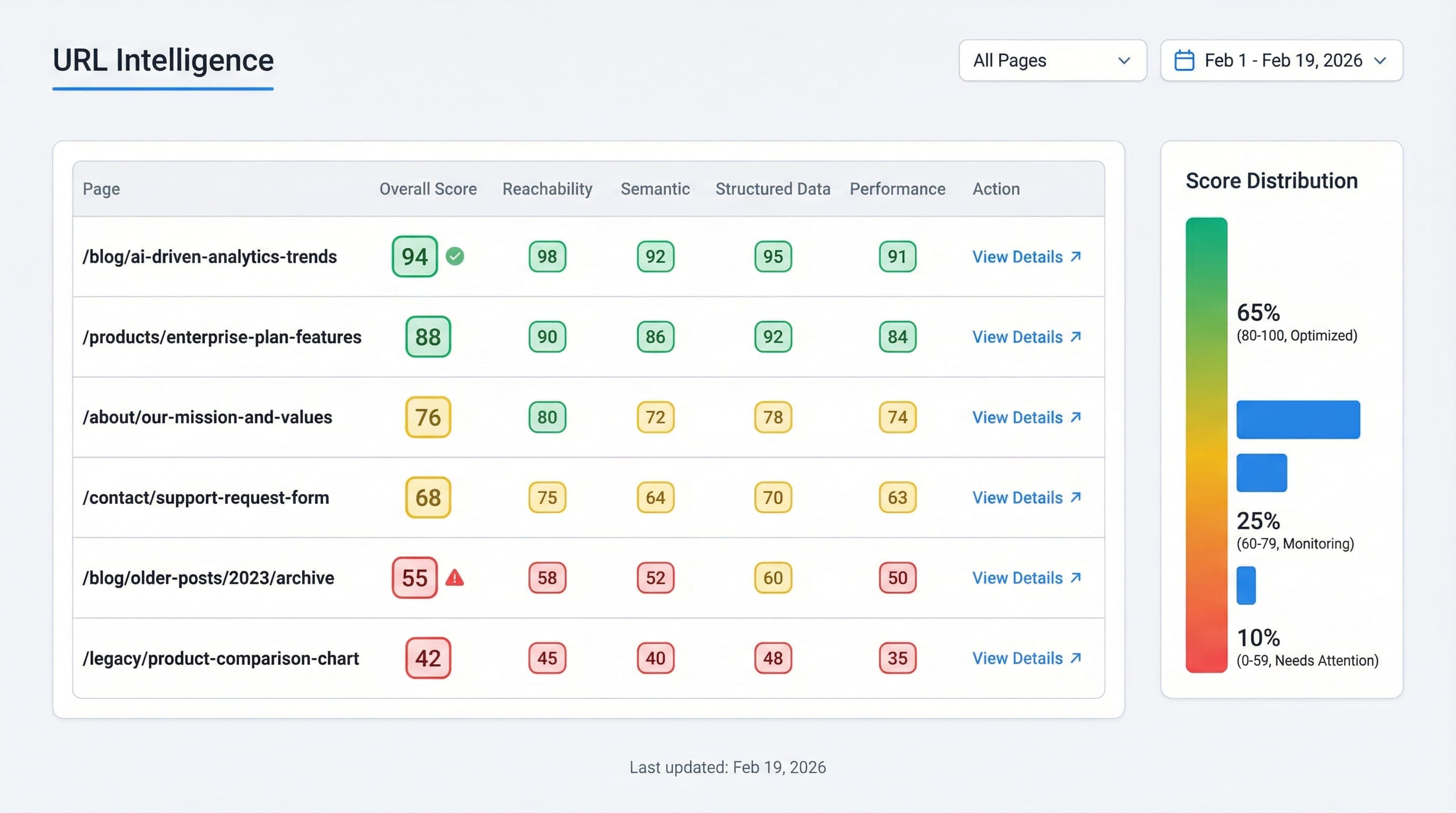
URL Intelligence scoring dashboard showing page-level scores across reachability, semantic relevance, structured data, and performance with 1-100 ranks

URL Intelligence scores every WordPress page 1–100 across four dimensions with fix-this-first recommendations.

URL Intelligence Scoring Dimensions

eLLMo analyzes every WordPress page across four dimensions and assigns a 1–100 rank with actionable recommendations.

DimensionDescriptionTypical Fixes
ReachabilityIs the URL discoverable and accessible (status, robots, sitemap)?Ensure in sitemap; avoid noindex; fix broken links; stable 200 responses.
Semantic relevanceTopical clarity and alignment to intent; headings and copy signals.Improve H1–H3 hierarchy; add concise summaries; clarify entities.
Structured dataPresence and correctness of JSON-LD schema types.Add/validate Article, FAQPage, Product, BreadcrumbList as applicable.
PerformanceCore speed metrics that affect crawlability and extraction.Optimize images, caching, critical CSS, reduce blocking JavaScript.

Code Samples

Standard WordPress integration patterns using core capabilities. No custom plugins required.

1. Minimal REST export for ingestion

Add a custom REST endpoint for bulk content export. Place in /wp-content/mu-plugins/ellmo-rest-export.php:

// /wp-content/mu-plugins/ellmo-rest-export.php
add_action('rest_api_init', function () {
  register_rest_route('ellmo/v1', '/export', [
    'methods'  => 'GET',
    'callback' => function () {
      $posts = get_posts([
        'numberposts' => 50,
        'post_type'   => ['post','page'],
        'post_status' => 'publish',
      ]);
      $data = array_map(function ($p) {
        return [
          'id'       => $p->ID,
          'type'     => get_post_type($p),
          'title'    => get_the_title($p),
          'url'      => get_permalink($p),
          'excerpt'  => wp_strip_all_tags(get_the_excerpt($p)),
          'content'  => wpautop(apply_filters('the_content', $p->post_content)),
          'modified' => get_post_modified_time('c', true, $p),
          'lang'     => get_bloginfo('language'),
        ];
      }, $posts);
      return rest_ensure_response(['items' => $data]);
    },
    'permission_callback' => '__return_true',
  ]);
});

2. Webhook ping on content changes

Notify eLLMo ingestion endpoints on publish/update/delete. Place in /wp-content/mu-plugins/ellmo-webhook.php:

// /wp-content/mu-plugins/ellmo-webhook.php
function ellmo_post_change_webhook($post_ID, $post, $update) {
  if ($post->post_status !== 'publish') return;
  $endpoint = 'https://api.tryellmo.ai/ingest/webhook'; // example
  $body = [
    'id'       => $post_ID,
    'type'     => get_post_type($post),
    'url'      => get_permalink($post_ID),
    'modified' => get_post_modified_time('c', true, $post_ID),
    'site'     => home_url(),
  ];
  wp_remote_post($endpoint, [
    'timeout' => 5,
    'headers' => ['Content-Type' => 'application/json'],
    'body'    => wp_json_encode($body),
  ]);
}
add_action('save_post', 'ellmo_post_change_webhook', 10, 3);
add_action('trashed_post', function($post_ID){
  // Send deletion notification with status=deleted
}, 10, 1);

3. Inject BreadcrumbList and Article JSON-LD

Add structured data for better semantic relevance and AI citation. Place in /wp-content/mu-plugins/ellmo-jsonld.php:

// /wp-content/mu-plugins/ellmo-jsonld.php
add_action('wp_head', function () {
  if (!is_singular()) return;

  $json = [
    '@context' => 'https://schema.org',
    '@graph' => [
      [
        '@type' => 'BreadcrumbList',
        'itemListElement' => [
          ['@type' => 'ListItem','position'=>1,'name'=>'Home','item'=>home_url('/')],
          ['@type' => 'ListItem','position'=>2,'name'=>'Integrations','item'=>home_url('/integrations/')],
          ['@type' => 'ListItem','position'=>3,'name'=>'WordPress','item'=>home_url('/integrations/wordpress/')],
        ],
      ],
      [
        '@type' => 'Article',
        'headline' => get_the_title(),
        'mainEntityOfPage' => get_permalink(),
        'datePublished' => get_the_date('c'),
        'dateModified'  => get_the_modified_date('c'),
        'author' => ['@type' => 'Organization','name' => get_bloginfo('name')],
        'publisher' => ['@type' => 'Organization','name' => get_bloginfo('name')],
      ],
    ],
  ];
  echo '';
});

Notes:

  • Use your eLLMo-provided ingestion endpoint and credentials.
  • Keep endpoints rate-limited and authenticated if necessary.
  • Validate structured data with Google's Rich Results Test in CI.
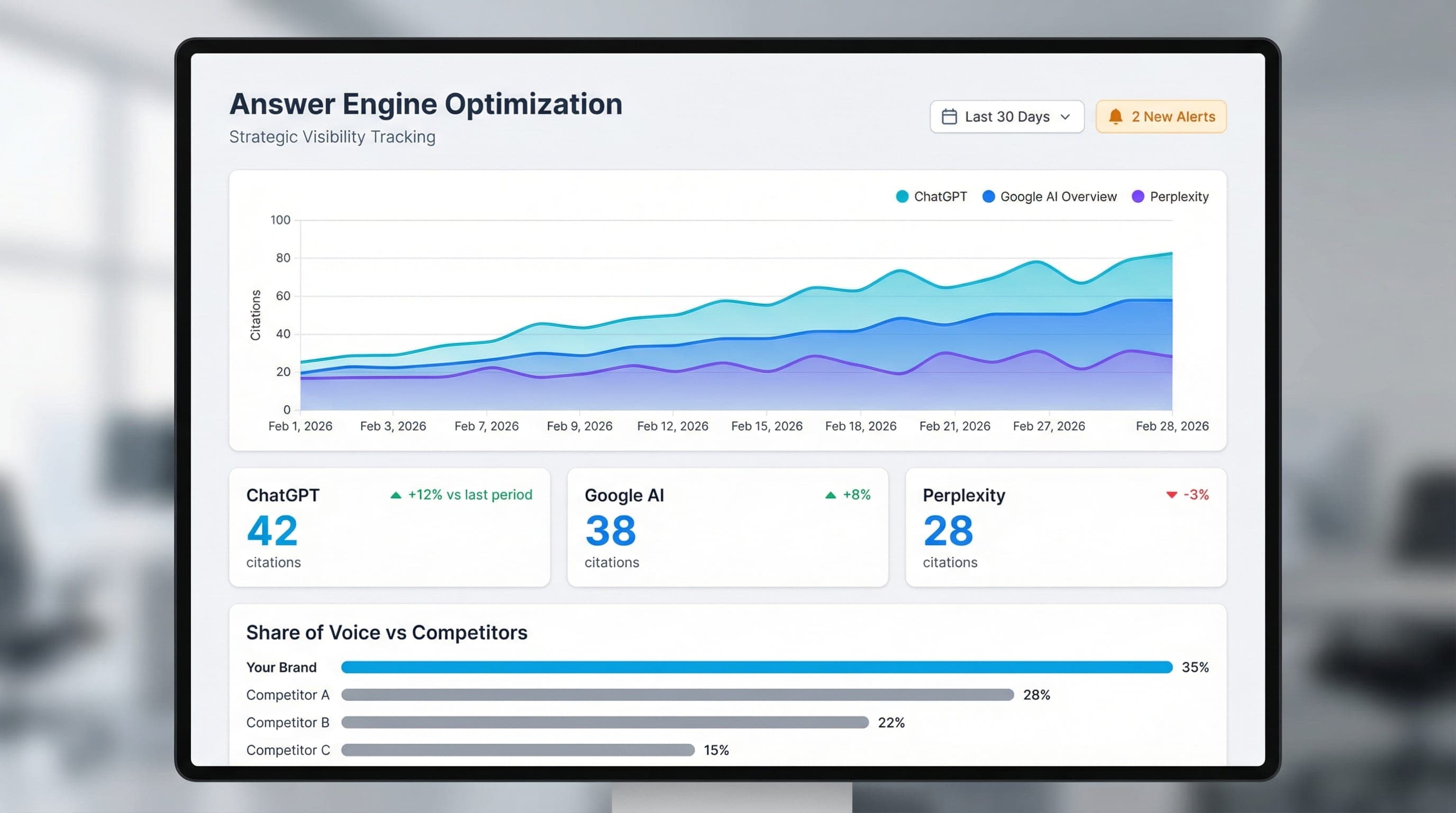
Answer Engine Optimization dashboard showing citations and mentions across ChatGPT, Google AI Overview, and Perplexity with trend lines and competitor benchmarks

Monitor your Share of AI Voice across ChatGPT, Google AI, and Perplexity with AEO dashboards, historical trends, and alerts.

Key Resources and Links

Frequently Asked Questions

Do we need to replatform to use eLLMo with WordPress?

No. eLLMo connects to your existing WordPress and optional WooCommerce stack via REST API and webhooks. No CMS replacement required.

How does URL Intelligence score pages?

It analyzes reachability, semantic relevance, structured data, and performance, then assigns a rank (1–100) with recommendations and deployment tracking.

Can we include WooCommerce products?

Yes. eLLMo ingests and enriches WooCommerce product data for agent-ready distribution across protocols and AI surfaces.

How do we expose content for ingestion?

Provide an XML sitemap and JSON via the WordPress REST API; optionally send webhooks on publish/update/delete for near-real-time ingestion.

Does eLLMo modify our content?

eLLMo provides recommendations (copy, FAQs, schema) and operational guidance. You decide what to publish in WordPress.

Which agent protocols are supported?

eLLMo supports UCP, ACP, MCP, and A2A, plus direct API integrations to all major AI platforms.

How is AI visibility measured?

Answer Engine Optimization dashboards track citations and mentions across ChatGPT, Google AI Overview, and Perplexity, with trends, alerts, and competitor benchmarks.

How long does initial setup take?

Typical readiness is under 4 hours, including data connection, URL discovery, and initial enrichment.

How do we manage governance and audits?

Confidence scoring, audit trails, and target management are built in to ensure enterprise-grade control and compliance.

What URL and breadcrumb practices should we follow?

Use descriptive, hierarchical URLs and add breadcrumbs; keep links crawlable and avoid multi-path duplicates per Google best practices.

Ready to Connect Your WordPress Site?

Schedule a demo to see the integration in action, or reach out for hands-on support.

Join Our Mailing List

Stay tuned. Join our mailing list to be among the first to experience the future of search. We'll be in touch with news and updates.

We respect your privacy. Unsubscribe at any time.

WordPress Integration: Agent-Ready Commerce Without Replatforming | eLLMo AI WordPress Integration